

Using Interim Assessment Results to Inform Next Steps for Instruction
Interim assessment results can provide information about
- student knowledge, by individual or group, after completing a unit of study;
- student or group response patterns on each item;
- students who have a strong grasp of the material and need enrichment activities to support expansion of their skills;
- grouping of students by knowledge or skill level for differentiated instruction; and
- areas to emphasize during classroom instruction.
To further help educators use results to inform instruction, the California Educator Reporting System links directly to the Smarter Balanced Tools for Teachers.
Smarter Balanced Tools for Teachers
The Tools for Teachers website is an online collection of supplemental instructional and professional learning resources. These resources are aligned with the English language arts/literacy (ELA) and mathematics state content standards, the California Next Generation Science Standards, or the 2012 California English Language Development Standards. They help educators implement the formative assessment process with targeted instruction to improve teaching and learning. Tools for Teachers was developed by educators for educators and provides a variety of resources, including the following:
- Instructional resources developed by educators through a collaborative development approach and quality-review process using a set of consistent criteria
- Formative assessment strategies embedded within the instructional resources for teachers to add to their instructional toolkit for establishing routines that engage students, check understanding, and allow real-time educational actions
- Accessibility strategies embedded within instructional resources (that is, lessons) to enhance instructional approaches that address the needs of all learners and includes tiered accessibility resources
- Interim Connections Playlists (ICPs) aligned with specific interim assessments to provide educators with information about performance descriptors, intervention ideas, academic vocabulary, and lesson plans that target skills and concepts
- Professional learning resources focused on how to support assessment literacy, deepen understanding of ELA and mathematics state content standards, use available assessment tools, support English learner (EL) students, and much more
Tools for Teachers includes several innovative design features that make it teacher-friendly. Search features help educators locate instructional resources that can be bookmarked and annotated with the “notes” feature. Instructional resources can also be printed and shared, including printing and sharing the activity with students. In addition, Tools for Teachers is web accessible (that is, WCAG 2.1 AA compliant).
Instructional resources include options for differentiating instruction, as well as student-focused accessibility strategies, formative assessment strategies, and additional support for EL students.
Tools for Teachers Interim Connections Playlists
The California Educator Reporting System (CERS) includes instructional resource (lessons) links designed to help educators use data from Interim Assessment Blocks (IABs) or Focused IABs (FIABs) for targeted, next-step instructional strategies. These resources were created by expert educators and reviewed by Smarter Balanced.
The ICPs link to resources in Tools for Teachers for the content assessed by specific IABs and FIABs. The ICPs and the linked instructional lessons within the ICPs are designed to support the skills and concepts measured on the interim assessments. They also help educators differentiate instruction by listing specific performance descriptors (for Below Standard, Near Standard, and Above Standard).
The Tools for Teachers ICPs are not meant to replace curriculum or define an instructional sequence. The resources can be implemented as offered or adapted to suit unique classroom and individual student needs. By considering interim assessment results along with other classroom assessment results, observations, and professional judgment, educators can decide how to use Tools for Teachers resources to support their instruction.
Educators can access ICPs through the [Tools for Teachers] button in CERS or directly through Tools for Teachers. The instructional resources attached to the ICPs have been created and reviewed by educators after they have analyzed the items in the associated interim assessment and offered their own best practices for differentiated instruction, formative assessment, and accessibility.
The sample Grade 4 Math—Geometry Connections Playlist (figure 1) is available publicly; however, access to the instructional resources within the playlist require a Tools for Teachers logon. Educators from California local educational agencies can obtain a Tools for Teachers account either through self-registration, described in the flyer How to Self-Register for Tools for Teachers, or through their testing coordinator.
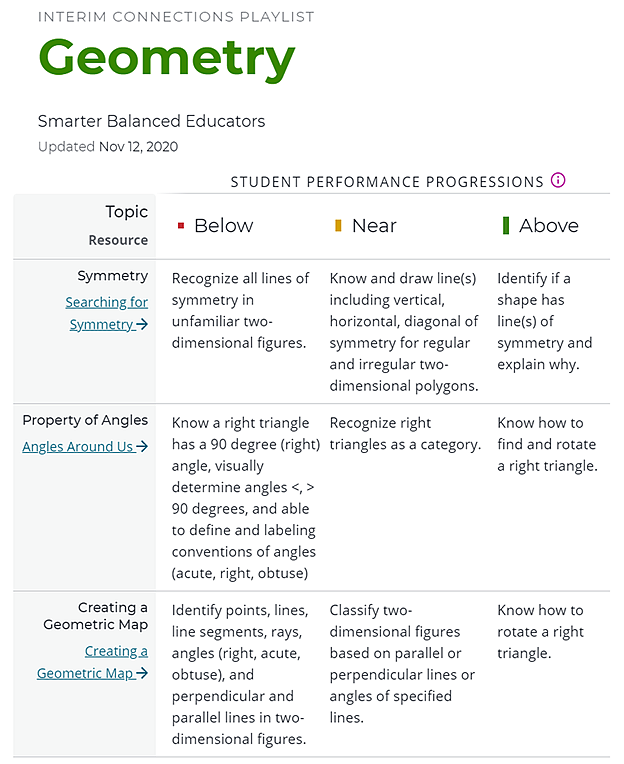
Figure 1. Smarter Balanced Interim Connections Playlist for Grade Four Geometry
Links to Tools for Teachers Resources
Each IAB or FIAB has a corresponding ICP available in Tools for Teachers. The ICP includes a Student Performance Progressions chart that shows the attributes of Below, Near, and Above standards for each topic or skill assessed. The ICP also includes links to instructional resources that have been written and vetted by teachers to use for targeted instruction with these same skills.
Interim Assessment Item Portal
The Interim Assessment Item Portal (IAIP) is a helpful tool to view live and secure interim assessment items for ELA and mathematics. It allows educators to tailor interim assessments to align with their instruction, including viewing, selecting or deselecting items, creating answer keys, and reviewing accessibility tools embedded within each item.
With similar functionality to the Sample Items website, the IAIP allows educators to complete the following actions:
- Easily find, access, display, and export relevant interim assessment items via a search by test name, grade level, claim, target, and standard
- Generate answer keys for use by teachers
- View and discuss individual items and answers with students or teacher teams
- Select items to create a PDF for download and print for use with students
For more details, refer to the Interim Assessment Guide or watch the Using the Interim Assessment Item Portal video.
Additional information about the interim assessment items (refer to figure 2) is available in the IAIP. These are the same interim assessment items available in the Test Delivery System, but this site is designed to support more flexible uses of interim assessment items for classroom needs.
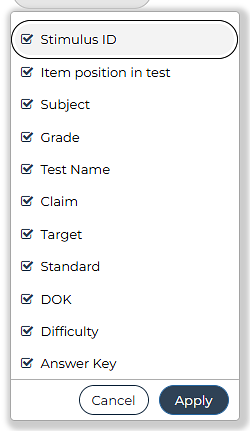
Figure 2. Drop-Down List from the IAIP
Writing Trait Scores and the Smarter Annotated Student Response Tool
In ELA, the performance tasks (PTs) involve writing. Written communication skills are important for students preparing for college and careers. The ELA PTs allow students to demonstrate their writing skills through real-world scenarios to support educators' scoring of the writing component of the PTs.
Smarter Balanced developed an easy-to-use application called the Smarter Annotated Response Tool (SmART). This tool provides samples of student work with rubric scores and annotated explanations for why a particular score was given.
Writing Trait Scores (Writing Extended Response [WER]) are available for ELA PTs and provide additional information about writing performance for a student. These scores are available on Individual Student Reports, as shown in figure 2.
Scoring rubrics for each trait establish the possible points a student can earn. They also provide a framework for educators to use when scoring and help increase consistency and decrease biases.
Each trait of the rubric is scored separately. For example, grammar and spelling are evaluated as part of the convention trait but not taken into account when scoring the other two traits. This allows students to demonstrate areas of strength and areas needing improvement across traits.
SmART can help educators better understand the rubrics, scoring, and the ELA PTs. For example, the annotated student work provided in the tool can help explain how aspects of a student's writing align with a score of two for the trait organization and purpose. For more information on SmART, watch the Getting Started with SmART video.
Finally, teachers can examine the writing scores of their own students and, in particular, look at patterns across students, classes, or schools. This process can inform areas of strength in teaching writing and areas for improvement, recognizing that the kind of on-demand writing on the summative assessment is only one form of writing.
Content Explorer
The Content Explorer is a tool that highlights the connections between ELA and mathematics state content standards and assessment targets. Its easy-to-use format provides quick access to grade-level content information for ELA and mathematics. The tool provides transparency for Smarter Balanced assessment development and design, bridging the gap between the language of assessment developers and educators.
The Content Explorer can be used to investigate the expectations such as claim, target, standards, clarification, range achievement level descriptors, evidence required, and information for item guidelines (that is, depth of knowledge, allowable item types, stimuli, accessibility).
Refer to the following simple analogy of a full bookshelf to better understand the claims, targets, and standards:
- The shelf that houses the books is the claim.
- Each book is a different target, and each book is made up of different pages, which are the content standards.
- When a content standard appears in more than one target, those pages can be found in more than one book.
For more information on the Content Explorer, watch the Smarter Balanced Content Explorer video.